Showing posts with label Pedagogy. Show all posts

Monday, January 30, 2017

An Interview With Marjorie Foth

A Little Bit About Marjorie

Marjorie is currently a grade four teacher with Edmonton Public Schools (EPSB) and has helped open one of the new schools. This is the second time she was a part of a staff that opened a new EPSB school. Marjorie is adjusting to the Edmonton climate again as this is her first year back in Edmonton after teaching for three years in Amman, Jordan at The International Academy - Amman. Marjorie and I did our after degrees together and have grown as teachers together. She started as a music teacher and has since taught grade four, five and six in Edmonton. She taught grade three and five in Jordan. You can find her on Google+.

The Interview

What technology skills should students have before coming into grade four?
By grade four, students should be able to log into a Chromebook efficiently and ideally remember their password (or at least keep their passwords somewhere where they can check). They should know their email includes @share.epsb.ca. It would be great if students had basic keyboarding skills before entering grade four. Knowing how to resize text so it is easy to read is another useful skill.  


Where do you get your edtech ideas?
I get ideas from teaching myself how to use a program and professional reading. I get ideas from other teachers and from professional development days. Sometimes I will search Google and Pinterest; Google+ can be good, too.


What type of technology do you have in your school/classroom?
Each classroom has:
  • A teacher desktop computer
  • Wireless keyboard
  • 20 Chromebooks
  • Document camera
  • A teacher iPad
  • Four mini iPads
  • Epson Interactive board


If you could only keep one technology at your school, what would it be? Why?
Chromebooks, hands down.


It is so easy for me to share something with students because Chromebooks make accessing Google Classroom easy. Google Classroom is easy to put assignments onto and then each student then has the visual in front of them.


However, it is important to have that social time together. Coming together to look at something on the Interactive Whiteboard is important, too.


What is one piece of technology you would like to try in your classroom that you haven't had an opportunity to yet?
The iPad and iPad minis. We have iPad minis available for classroom use. I have never used an iPad in class before.


What is something new you are planning to teach this year?  
I have done coding with my students for the past two years. This year I want to have my students program robots such as Dash and Dot and do some more advanced coding with Scratch.


How has technology changed the way you teach?
It has transformed the way I teach, 100%. When I started teaching there were still film strips, chalkboards and overhead projectors. It has made everything easier. It is easier to communicate with students. It also enables students to use a variety of ways to show their learning, such as talk to text if they are struggling.


How do you decided what is worthwhile for students to learn through technology?
You need to have a balance between technology and books. Students still need to have book in their hands. I disagree with those people who say students do not need proper books, that loading everything on a Kindle is enough. Likewise, students need to learn how to print properly and write legibly. Typing is great but there has to be a balance. I have really noticed a change over the past few years  in the quality of student’s printing.


What are your favourite apps/tech tools/websites?
  • Senteos (we had them at my previous school but not this one)
  • Google Classroom, I use a different classroom for each subject.


What are your hopes for edtech in the future in your classroom? Alberta? Canada? Globally?
For my classroom, it is coding. For the past two years I have done coding with my students. This year I am hoping my students can transfer what they learn from block coding and use actual coding language to make their own simple game. I think it is important for them to transfer what they learn (coding) and apply it or teach others how to do it.


I think for all of Edmonton and even globally, there needs to be equality across schools in terms of access to technology. Not all schools in Edmonton have the same type of technology. Globally many classrooms of course do not have technology but it would be nice to one day have all classroom with accessibility - though thinking of what many countries are facing I don't see that in the foreseeable future.


If you had to interview someone for division one educational technology. Who would you pick?
Melinda Martin at the International Academy Amman knew a lot about technology. I use many of her ideas in my classroom this year.


What question did I miss asking in your opinion?
I think you missed asking about teacher training. What is being done to train teachers to use technology? I think that is lacking. Often you are given new technology and just have to figure it out.

----------------------------------
Thanks to Marjorie for taking the time to share her ideas. Stay tuned for February's interview. 

Related blog posts:

Monday, November 7, 2016

An Interview With Amanda Fahey

A Little Bit About Amanda

Amanda is a grade three teacher with the Lethbridge School District No. 51. She is on Twitter, @amandafahey13, and Google+. Her Google+ profile says: Never let an opportunity pass you by! And if you follow her on Google+ or read her blog, Mrs. Fahey’s Class, you will see she does not let an opportunity pass her class by. 

I have always been inspired by Amanda's ideas and classroom activities. I think after you read this interview you will be, too!

What technology skills should students have before coming into the grade(s) you teach?
Students should know the basics:
  • how to log on
  • how to find various programs (Chrome, searching with Google, Word)
  • how to copy/paste
  • how to save documents to a USB.

Where do you get your educational technology ideas?
I get ideas from Google+, Professional Development Days, colleagues and blogs.


What type of technology do you use in your school?
My school has laptops, desktop computers, iPads, webcams, and Smartboard.

Imagine you only could keep one technology at your school. From the ones you listed about what would be the one you would keep? 
iPads

Based on your response to the question above. Why would you keep that technology?
There are so many useful iPad apps that I enjoy using with my students. Students can still access the internet (Google) from an iPad, as well as use Google Docs, or Microsoft Word to complete class assignments. It also opens opportunities for new apps and ways to complete assignments rather than basic paper and pencil. As well an iPad has a camera, therefore we could complete Hangouts with other students.


What is one piece of technology would you like to try in your classroom that you haven't had an opportunity to yet?
3D printer


What is something new or different you are planning to try this year?
I plan on teaching one-on-one Google Hangouts with our penpal/collaborative blog class. I am also going to attempt a Robotics lab this year. 


How has technology changed the way you teach?
Technology has allowed me to go outside my comfort zone and find new ways to be innovative within the classroom. Instead of all students having the same project, which needs to be completed in the same way, I find technology allows me to give my students more opportunity to be unique and creative and find their strengths to show their learning. As well, technology has allowed me to meet and collaborate with so many other teachers all over the world. Completing mystery hangouts, or collaboration projects with classes in the USA, Brazil or Australia has allowed me to change the ways I teach being a Global Citizen and how to be a "safe" technology user to my students. My focus is to teach my students about a positive digital footprint.

How do you decide what is worthwhile for students to learn through technology, given literacy and skill challenges in division one?
Technology is incredible, but students still need the opportunity to use paper and a pencil. However, I decide what is worthwhile based on my individual students. I assess their needs and go from there. I try to find apps or tasks that can be easily modified to meet my students needs. For example, having a built in voice recorder or a "read to me" feature is always helpful for those struggling readers/writers. 


What apps or technology tools do you use? Are there any that you use for specific projects?


  • Google Hangouts - As a class, we complete many mystery location hangouts, mystery number hangouts, as well we meet with our penpal class. This year we are working on a Connected Reader’s Club as well which is absolutely fantastic!
  • News-O-Matic - I use this app for our Newspaper day. I also incorporate it into Daily 5 centers for a listen to reading center.
  • Popplet - This is a favourite when we are brainstorming, specifically before a writing task.
  • Green Screen - I use across all subject areas. I enjoy using Green Screen mostly for social and science as a way for students to show their learning at the end a specific unit. For example, students use it when describing an animal, or a country in social studies. We've also used Green Screen as a way of publishing fractured fairy tales. Students draw the scenes, and as we read the stories, their drawings are the backdrop. Super student friendly.
  • Class Dojo - I use it for classroom management.
  • Google Translate - I use this to support ELL learners.
  • Google Earth - I use Google Earth when we have mystery location hangouts. This year we’ve used Google Earth quite a bit as an introduction to the Grade 3 Social Studies curriculum which focuses on Peru, Tunisia, India and Ukraine.
  • Word Clouds - I use this for writing activities.
  • Skitch - This is a great labelling app which is extremely useful, specifically in science, when introducing a new topic. As well I use it in Language Arts for vocab development in word work centers.
  • QR Code Reader - I use this app mainly in math for games or problem solving. Students use the QR code to check their work. However, we use QR codes in language arts for tricky words, and to listen to reading.
  • KidBlog - We journal using Kidblog rather than a typical journal notebook. Our blog is then linked with our grade 3 classes throughout Canada and the USA, where we discuss various topics, and complete collaboration writing projects.
  • Quiver - This is a fantastic app that makes artwork pop like 3D! 

What are your hopes for educational technology in the future in your classroom? Alberta? Canada? Globally?
I would like to see a specific technology curriculum, where skills are broken down into grade specifics. Not all teachers are as comfortable with technology as others, therefore we get students who still are unsure how to log on etc which makes things rather difficult sometimes. But in order for that to work, more professional development would have to be offered. I hope that educational technology becomes the norm within our classrooms, and students become great global technology users where they are aware of how to be safe and effective users.

I also hope for generalized programs where the province or even country can use similar programs, ie. Google Apps for Education, so that students of similar grades can collaborate with other students throughout the country, opening up more opportunities and giving students a wider perspective on the topic, or life in general.


Check back for the December interview with Marjorie Foth.


Related blog posts:

Thursday, September 8, 2016

An Interview With Shannon Pasma Part Two

An Interview With Shannon Pasma Part Two

I recently sat down with Shannon Pasma at Cafe Bicyclette for a chat about everything grade two and educational technology. Here is part two of an abridged version of our chat. Don’t forget to read part one!


A Little Bit About Shannon
Shannon teaches in the Elk Island School Division and is going into her fourth year of teaching grade two (her favourite grade). She has also taught grade one and five. Her school is one-to-one Chromebooks grades two to six. She also has five iPads in her class and access to sign out a whole cart of iPads as needed. You can find her on Google+ and on Twitter as @ShannonPasma. She is also the co-author of an e-book for grade two social studies which she created as a part of her masters in Educational Technology in Elementary Education.


What apps or technology tools do you use? Are there any that you use for specific projects?
Anytime an app has dual application (like being able to record your voice), I like that.  If I can use it across the subject areas, I’m good with it, rather than a one-off app. Some of the tools I use all the time are:
    • I especially love Google Slides. I like to use it for pretty much anything from How To writing to Non Fiction writing to Timelines. I like to use Screencastify to have voice connected to work if images are just included.
    • Or any recordable whiteboard app. Again, great for anything you want the students to explain a process or thought. I like this especially for math. My students create problems and then solve them recording their work and voice.
    • Great for digital posters or scavenger hunts in 2D shapes and 3D objects. Lends itself well to labelling.
    • Great for social studies, too. Students can make a poster about the community.
  • Popplet for mind maps.
    • We often turn a story into a script. PuppetPals is used as a choice to act out the script if students don't want to perform in front of the class. I also like to have the students do a Bug Talk Show and interview various creatures in science. I love to see their creativity come out.
  • Seesaw (but you can’t upload from Google Drive)
  • Google Classroom is an absolute must in my room!
    • During the first weeks of school we create iMovie trailers to show/teach/reinforce classroom routines. My students like to also use the DoInk Green Screen app to integrate with iMovie.
You made an e-book. Do you still make them?
No.


They take forever. You have to find images you can use. You have to write your own content. You have to cite all of your stuff. You have to record each of your voice sections and then put it in the book. Each of the widgets we had, most of them were from third party sites so you had to download them and then upload them. Saving it on the Mac (iBooks Author) and then trying it on your iPad. The hardest part was finding a site to hold it and share it out so people could download it. It is so huge to download it so it takes forever. It’s a lot of work.
2016-07-28_1741.png
After we made the first one, I saw how successful it was with my students.  That’s when I had a student with a learning disability, so I couldn’t take that away from her. So I just had to do them.  It would take me a whole Saturday and Sunday to make them. But now that they are done, they’re done. However I have noticed a couple of the videos are missing because they are not on YouTube anymore. So now it’s about going back and fixing them. Then re-downloading and re-uploading them again.

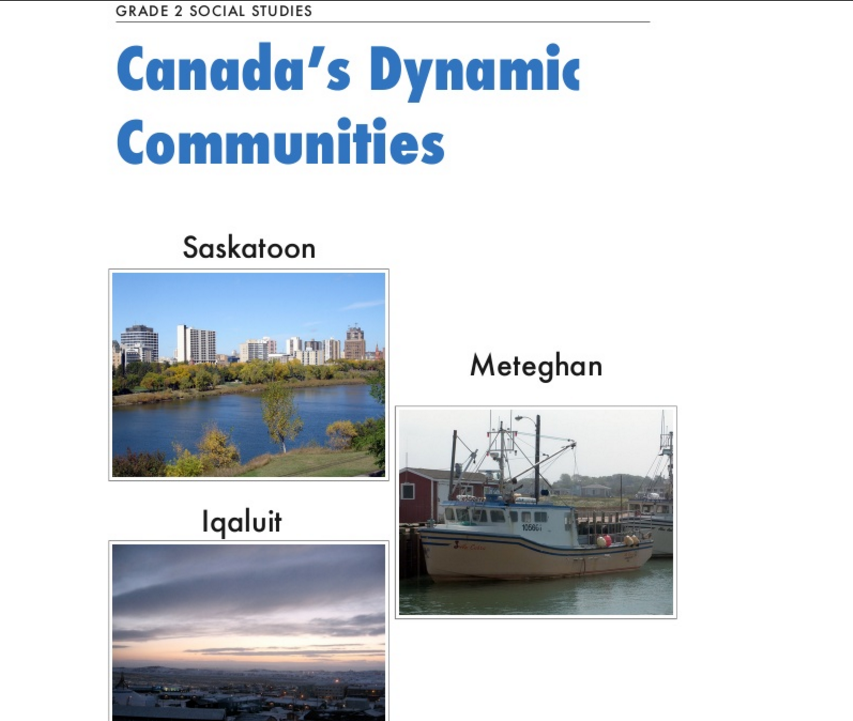
You can download them here: Exploring Iqaluit, Meteghan, and Saskatoon

You had a five week student teacher this year. How prepared did you feel they were edtech-wise?
Very unprepared.


I want to make a course or workshop for preservice teachers to learn how to use technology. I would open up my classroom to them. They could come in and observe some tools and see what there is. In the course/workshop we’d talk about the tools and how to use them. They would have to create lessons to go with the technology so they actually feel prepared. Most preservice teachers have no educational technology skills.


If you had to interview someone for division one educational technology. Who would you pick?
You know who I really want to sit down with? Catherine D off Twitter. We had really great conversations at the ERLC Educational Technology Innovation Summit. I would love to sit down with her for the whole day.


Last question for you, what are your hopes for educational technology in the future in your classroom? Alberta? Canada? Globally?
Lots.  


If kids don’t learn some technology skills, like coding,  I can only imagine 2025! They are going to have to have these skills. I feel if you don’t start teaching them these things they are going to be behind and unprepared. I feel that if teachers don’t get on board with the current educational technologies they are going to be even further behind and then you are doing a disservice to your students. This [phone] is your life. Literally you can do everything on here and you don’t need anything else. I hope that teachers catch on.


It [the future] is going to be kids coming with greater skills and expected to do a lot more but connect globally. I  feel like it is no longer about working in the isolation of your classroom. I feel that Global Read Aloud is the start of zero barriers. You are going to be learning from each other.   


The flexible seating movement is on the cutting edge of - you don’t need to learn in “this” way, you can learn in your own way. I feel like there is going to be more individualized learning. I think desks and rows are by-gone things now.


It’ll be interesting to see what happens.


I would like to thank Shannon for an extremely enjoyable chat through an epic thunderstorm.


Check back for the October interview with Alicia Kuzio.


related blog posts:

Thursday, September 1, 2016

An Interview With Shannon Pasma Part One

Perspective From The Park


I recently sat down with Shannon Pasma at Cafe Bicyclette for a chat about everything grade two and educational technology. We chatted for almost three hours! So here is part one (of two) of an abridged version of our chat.


A Little Bit About Shannon


Shannon teaches in the Elk Island School Division and is going into her fourth year of teaching grade two (her favourite grade). She has also taught grade one and five. Her school is one-to-one Chromebooks grades two to six. She has five iPads in her class and access to sign out a whole cart of iPads as needed. You can find her on Google+ and on Twitter as @ShannonPasma (and her class account is @misspasmasclass). She is the co-author of an e-book for grade two social studies which she created as a part of her Masters in Educational Technology in Elementary Education. You may have read her blog Elementary Elements or you may have seen her on TV last year.


The Interview

Ideally, what technology skills should students have before coming into grade two?

It would be great if they knew how to log onto a Chromebook already. I would really like if they knew how to use some basic iPad apps such as Explain Everything or how to record something; that would be huge. I use PicCollage a lot, so it would be great if they knew how to insert a picture or be able to do some typing.


Where do you get your educational technology ideas?
Shannon Pasma at ERLC's 2016 
Educational Technology Innovation 
Summit with Christine Quong and 
Karla Holt.

I brainstorm with Karla Holt and Christine Quong; we text each other a lot. I talk with the techie people at school. Online, sometimes I go on Twitter to get ideas but I never really tweet about them. Seeing some of your stuff that you did. Or out of my own brain or from ideas that students have. 

When using my e-book with the students I see how they have become really comfortable with the technologies used in it. We made it so the apps were repeated over and over again so the students get really comfortable with them. So my students have become really comfortable saying “can I do this and do this for it”, so lots of it [edtech ideas] comes from them bringing it up.


What hashtags do you follow on Twitter?

I follow:
     #2ndchat
     #abedchat
     #edtech
     #edtechchat
     #gafesummit
     #geniushour
     #makered


What type of technology do you use in your school?

We have iPads, Chromebooks, SMARTBoards and webcams. Like you, I personally got an ozobot. I got a grant for MakerSpace stuff. We are starting a MakerSpace in the fall. My Dot and Dash is coming at some point this summer. I also got the Bits Box. Then there is a tricaster that we are sharing with another school for school announcements. 


So you have iPads and Chromebooks in your class. If you had to keep one and get rid of the other, which of the two would you keep?

Oh. I use both ALL the time. Well, the Chromebook apps are getting a lot better than they used to be, so I’ll say Chromebooks. 

Based on your response to the question above, why would you keep that technology?

Chromebooks are easier for inquiry. I love Read and Write for Google and it’s harder to access on an Apple device. It is easier to access to save and store things on a Chromebook than an iPad.

You might be too young for this question to apply to you but how has technology changed how you teach?

Oh lots! They were installing SMARTBoards the first month of my first teaching contract. It [a SMARTBoard] went from wow to meh. Now I use it as my whiteboard pretty much and to project things off my computer. So I think it [educational technology] has gone from engaging kids up here [on the SMARTBoard] to now you have to actually change your teaching and tailor it so the kids can be successful so it’s not everybody is doing the same thing. Technology has changed teaching so that everyone can do “it”, whatever “it” is. They can choose how to be successful and use technology, or not.

In my classroom, if I partner them up, they are really good at socializing using technology. If I partner them up with a paper activity, not so much because they are not sharing the same thing. There is more conversation when they are on technology whereas they hunker down with a piece of paper and keep to themselves.

I had a student with a learning disability two years ago. She was very tech savvy. She was reading well below grade level. She wouldn’t write anything down because she couldn’t. She would say “can you film me now” and she would talk off the top of her head and it was fabulous. She knew her stuff. If you told her to write it down on a piece of paper she wouldn’t have known her stuff because she wouldn’t have been able to get it out. Technology levels the playing field.


How do you decide what is worthwhile for students to learn through technology, given literacy and skill challenges in grade two?

I do Daily Five. When students are listening to reading they might use technology like Epic!. Sometimes they would do word work on the iPads. I do not have them do free writing on the Chromebook or that much literacy stuff with technology. They need to sit and talk with each other and they still need to do a print book. So during literacy time, honestly, it was not much technology when we were reading or writing. When we did projects or research then they would use technology.


Check back next week for part two of my interview with Shannon. 

related blog posts: